编码
小程序端
直接使用 AI 编程,说出需求后,五分钟拿到效果图:
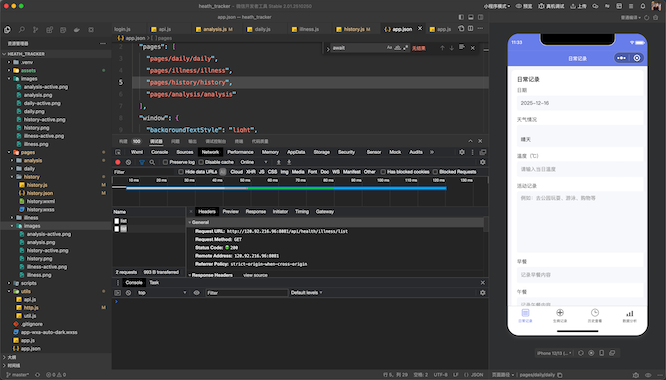
大家想一起开发的,地址在这里:https://gitee.com/kysonkyson/heath_tracker
直接 提 merge request 即可。
后端
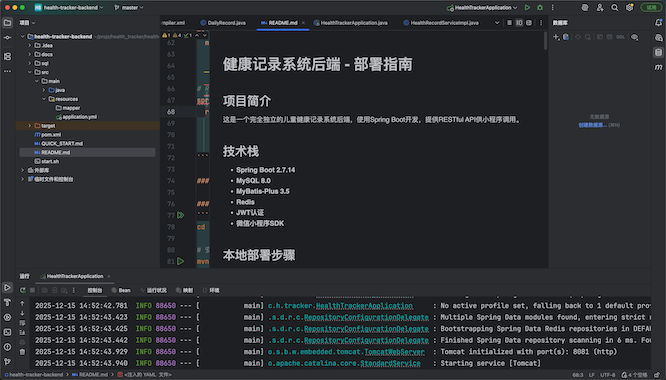
一样,使用 AI 编程,10 分钟出结果:
发布前准备工作
打包本地代码
cd
   /Users/mac/projs/health_tracker/health-tracker-backend
   && mvn clean package -DskipTests 2>&1 | tail -20
创建目录
ssh root@120.92.216.96 "mkdir -p /opt/health-tracker &&
    ls -ld /opt/health-tracker"
上传包
scp /Users/mac/projs/health_tracker/health-tracker-back
   end/target/health-tracker-backend-1.0.0.jar
   root@120.92.216.96:/opt/health-tracker/app.jar
#Upload JAR to server
服务端
判断是否安装 Java,Mysql,Nginx
ssh root@120.92.216.96 "java -version 2>&1 | head -1;
      mysql --version 2>&1 | head -1; nginx -v 2>&1"
MySQL 处理
启动 Mysql:
ssh root@120.92.216.96 "systemctl start mariadb &&
   systemctl enable mariadb && systemctl status mariadb |
   grep Active"
建表:
ssh root@120.92.216.96 "mysql -uroot -e \"CREATE
   DATABASE IF NOT EXISTS health_tracker CHARACTER SET
   utf8mb4 COLLATE utf8mb4_unicode_ci; CREATE USER IF NOT
   EXISTS 'health_user'@'localhost' IDENTIFIED BY
   'Health@2025'; GRANT ALL PRIVILEGES ON health_tracker.*
    TO 'health_user'@'localhost'; FLUSH PRIVILEGES; SHOW
   DATABASES LIKE 'health%';\""
GUI 工具查看
可以使用 dbeaver 这款工具。官网在这里:https://dbeaver.io/,
比较强大:
Jar 包处理
验证
ssh root@120.92.216.96 "journalctl -u health-tracker -n
    50 --no-pager"
   Check service logs
确定 8081
ssh root@120.92.216.96 "lsof -i:8081 | grep LISTEN ||
   netstat -tlnp | grep 8081"
   Find process using port 8081
杀掉之前的,启动新的:
ssh root@120.92.216.96 "kill -9 81700 && sleep 2 &&
   systemctl restart health-tracker && sleep 8 &&
   systemctl status health-tracker | head -20"
   Kill old process and restart service
启动服务
ssh root@120.92.216.96 "systemctl daemon-reload &&
   systemctl stop health-tracker && systemctl start
   health-tracker && systemctl enable health-tracker &&
   sleep 5 && systemctl status health-tracker | head -15"
   Start health-tracker service
配置 Nginx
Check
ssh root@120.92.216.96 "ls -la /etc/nginx/conf.d/*.conf
    && cat /etc/nginx/conf.d/*.conf 2>/dev/null | head
   -50"
   Check existing Nginx configs
配置 Nginx
ssh root@120.92.216.96 "nginx -t && systemctl reload
   nginx && systemctl status nginx | grep Active"
   Test and reload Nginx
curl -X POST http://api.gojito.top/api/user/login -H
"Content-Type: application/json" -d
'{"code":"test_123"}' 2>&1
Test API login endpoint查看 Nginx 配置
ssh root@120.92.216.96 "cat >
   /etc/nginx/conf.d/default.conf << 'EOF'
   server {
       listen 80 default_server;
       server_name _;

       client_max_body_size 10m;

       location /api/ {
           proxy_pass http://127.0.0.1:8081;
           proxy_set_header Host \$host;
           proxy_set_header X-Real-IP \$remote_addr;
           proxy_set_header X-Forwarded-For
   \$proxy_add_x_forwarded_for;
           proxy_set_header X-Forwarded-Proto \$scheme;
           proxy_connect_timeout 5s;
           proxy_read_timeout 60s;
       }

       location / {
           return 404;
       }
   }
   EOF
   cat /etc/nginx/conf.d/default.conf"
   Create default Nginx server block
重新加载 Nginx 配置:
ssh root@120.92.216.96 "nginx -t && systemctl reload
   nginx" && sleep 2 && curl -X POST
   http://120.92.216.96/api/user/login -H "Content-Type:
   application/json" -d '{"code":"test_123"}'
   Reload Nginx and test API